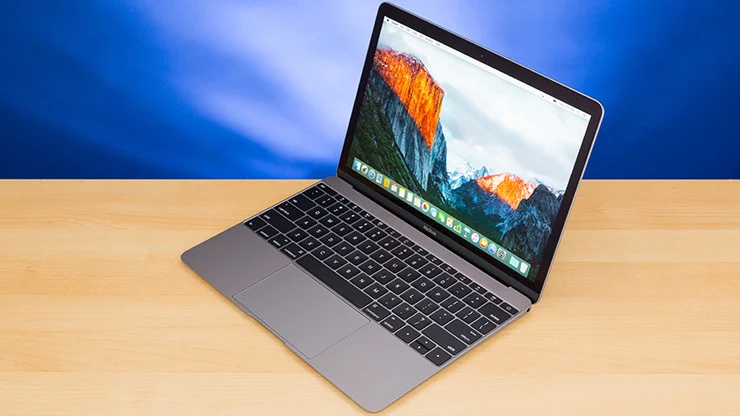
About this MacBook 12in M7
When the MacBook 12in M7 was first released in Early 2016, I remember being impressed by how light and compact it felt compared to the previous MacBooks. The A1534 device (MacBook9,1, EMC 2991) came in stylish Rose Gold, Space Gray, Gold, and Silver finishes, making it one of the first Apple laptops to add such variety. Apple offered it as a BTO/CTO configuration, which meant you could get it with an upgraded processor like the 1.3GHz Intel Core m7 Skylake (M7-6Y75) or even Core i5/i7 Turbo Boost models. With its 12-inch Retina display running at 2304 x 1440 resolution, the LED-backlit IPS technology gave a crisp view with 226 pixels per inch—individual pixels weren’t noticeable even up close. I personally liked how it supported scaled resolutions like 1440 by 900 and 1280 by 800, which made multitasking smoother.
Inside, it packed 8GB 1866MHz LPDDR3 onboard memory, a choice of 256GB or 512GB PCIe-based flash storage (soldered to the motherboard, so it couldn’t be upgraded), and an Intel HD Graphics 515 GPU. For daily use, its battery life was strong—around 10 hours wireless web and 11–12 hours iTunes movie playback thanks to the 41.4W Li-Poly battery paired with a 29W or 30W USB-C power adapter. What stood out to me was how much Apple managed to fit into such a thin design, measuring only 0.14–0.52 inches thick and weighing just 2.03 pounds (0.92 kg). With Wi-Fi 802.11ac, Bluetooth 4.2, a USB-C port for charging and expansion, plus stereo speakers, dual microphones, and a 480p FaceTime camera, it felt like a futuristic step forward.
Storage and Memory Performance of MacBook 12in M7
One of the key things I noticed when using the MacBook 12in M7 was how fast the PCIe-based flash storage felt. Apple offered 256GB and 512GB SSD options, both soldered to the motherboard, meaning they cannot be upgraded later. The storage speed ranged between 845 MB/s and 947 MB/s, which made opening apps, loading files, and even booting into macOS 10.11.4 (later upgradeable to macOS 12) feel almost instant. Compared to the older hard drives, this level of speed really changed how smooth everyday computing felt on such a thin notebook.
The memory architecture also stood out. The device came with 8GB 1866MHz LPDDR3 SDRAM as standard, and while it was onboard memory (so not replaceable), it worked in perfect sync with the Intel Core m7 processor and the Intel HD Graphics 515 GPU. This setup shared system memory for graphics, but even with that, performance was strong for light creative tasks like Photos, iMovie, or even GarageBand. The 4MB Level 3 cache, dual-core processors running up to 3.6GHz Turbo Boost, and the 64-Bit architecture gave it a balance of efficiency and capability. From my personal use, the smooth multitasking between Safari, Mail, and FaceTime made it feel far more powerful than its size suggested.
Battery Life and Connectivity
What impressed me most about the MacBook 12in M7 was its battery life. Apple managed to fit a 41.4-watt-hour lithium-polymer (Li-Poly) battery inside its slim 0.14–0.52 inch frame, and it consistently delivered up to 10 hours of wireless web use, 11–12 hours of iTunes movie playback, and almost 30 days of standby time. I relied on the 29W and 30W USB-C Power Adapter for charging, and it was reassuring that the same USB-C port handled both power and expansion. For travel, this single-port design made things simple, even if it required a few USB-C Multiport Adapters (like VGA or HDMI) for connecting external displays.
On the wireless side, Apple equipped it with Wi-Fi 802.11ac that was backward compatible with 802.11a/b/g/n, and Bluetooth 4.2 wireless technology. These features made syncing with devices like the Magic Keyboard, Magic Mouse 2, and even headphones or microphones over optical digital audio in/out seamless. The inclusion of a 480p FaceTime camera, stereo speakers, dual microphones, and a 3.5 mm headphone jack gave it enough versatility for calls and entertainment. In my experience, the dual-display support and ability to mirror content at 4096-by-2304 resolution at 60Hz was a big leap for such a lightweight notebook—perfect for when I connected an LG UltraFine 4K display at my desk.
Keyboard, Trackpad, and Everyday Use
Typing on the MacBook 12in M7 was a unique experience because of its full-size keyboard with 78 (U.S.) or 79 (ISO) keys, each individually LED backlit. Apple included 12 function keys, 4 arrow keys, and an ambient light sensor, which adjusted brightness depending on the room. At first, the shallow travel took me time to get used to, but over time the precise cursor control and pressure-sensing capabilities of the Force Touch trackpad made up for it. The ability to perform force clicks, use Multi-Touch gestures, or even apply pressure-sensitive drawing in apps like Preview felt ahead of its time.
For audio and visuals, the stereo speakers provided surprisingly clear sound for such a slim notebook, and paired with the FaceTime camera and dual microphones, I often used it for video calls without needing extra gear. Even details like the 3.5 mm headphone jack and optical digital audio in/out added versatility, letting me connect both modern and older equipment. Combined with Retina display visuals, the system felt built for a mix of productivity and entertainment. From writing long documents on Pages to sketching ideas with the trackpad, this device showed how Apple balanced sleek design with useful capabilities.
Operating System, Accessibility, and Built-in Apps
Out of the box, the MacBook 12in M7 came with macOS X 10.11.4 (15E2066), but Apple made sure it could be upgraded all the way to macOS 12. Over the years, I enjoyed how each operating system release—from macOS Mojave to newer updates—added fresh features without slowing the device down. Apple’s design philosophy made the system feel natural for everyone, whether you were a casual user or a powerful user managing heavier workloads. Every click felt smooth, and the latest operating system always kept apps like Safari, Mail, and FaceTime responsive.
What stood out for me was Apple’s attention to accessibility. The laptop supported vision, hearing, motor skills, learning, and literacy needs with tools like VoiceOver, Zoom, Increase Contrast, Reduce Motion, Siri, Dictation, Switch Control, Closed Captions, and Text to Speech. I saw firsthand how these accessibility features made the MacBook usable for people with different abilities. Alongside that, the built-in apps such as Photos, iMovie, GarageBand, Pages, Numbers, Keynote, Notes, Calendar, and Time Machine were more than just extras—they turned the MacBook into an all-in-one creative and productivity hub. Personally, I used GarageBand for quick audio projects and Pages for reports, and it felt empowering to have such tools ready right from the start.
More read on: Google Pixelbook 12in
Finish and Colors
One of the most appealing parts of the MacBook 12in M7 was its elegant finish. Apple gave users four choices — Rose Gold, Space Gray, Gold, and Silver. Each color looked premium, and I still remember how the rose gold version turned heads whenever I pulled it out in a café. The aluminum casing made the colors pop while keeping the laptop lightweight and durable.
Unlike the chunkier builds of previous MacBooks, this model felt like a refined accessory that fit into both work and lifestyle. Personally, I chose space gray for its subtle look, but I often wished I had gone for gold just for its bold presence. No matter the choice, every color highlighted Apple’s focus on design and individuality.
Everyday Experience
Using the full-size keyboard with 78 keys (U.S.), backlit support, and Force Touch trackpad was smooth. I liked the precise cursor control, and pressure-sensitive clicks added functionality I hadn’t realized I needed until I had it.
The stereo speakers and dual microphones were surprisingly good for such a thin laptop, and though the 480p FaceTime camera was underwhelming, it did the job for casual calls.
Final Thoughts on MacBook 12in M7
The MacBook 12in M7 wasn’t about raw power — it was about elegance, portability, and just enough performance to keep things running smoothly. For me, it served as the perfect device when I needed a reliable laptop for work and travel. The blend of design, improvement in processors, and capabilities made it one of the most interesting MacBooks Apple ever released.
Thanks For Reading
More Read On Tech Bable